
Download String Sort (Text Sort Tool) – text sort tool, string sort, sort text, sort strings, sort data, remove duplicates, duplicate remover, text management, text organizer, organize text, text utility, text tool, text processor, text editor, sort text app
Overview
String Sort (Text Sort Tool) is a focused utility application designed to streamline the organization of text-based data on Android devices. Its primary purpose is to help users sort, clean, and manage textual content efficiently, making it ideal for individuals who frequently handle lists, code snippets, data entries, or any form of raw text. The app addresses common challenges such as disorganized data, redundant entries, and inconsistent formatting by offering reliable sorting and deduplication tools.
It is particularly useful for students, developers, content creators, and professionals managing spreadsheets or database inputs. The application supports multiple sorting methods, including normal, reversed, random, and numerical order, enabling users to adapt the tool to their specific workflow. It also includes case-sensitive sorting, which adds precision for technical or sensitive data handling.
While the developer did not provide additional background information, the app’s straightforward design and targeted functionality suggest a developer focused on utility and performance. Real-world use cases include preparing data for import into other tools, cleaning up copied text from web sources, or organizing keywords for SEO. In the broader productivity app ecosystem, String Sort fills a niche by delivering a lightweight, no-frills solution for text manipulation tasks.
Key Features & Functionality
- Multiple Sorting Options: Users can sort text in standard ascending order, reversed descending order, random sequence, or numerical order based on numeric values within strings. This flexibility allows users to adapt the app to various data types and use cases.
- Remove Duplicates: The app automatically detects and removes duplicate entries, ensuring that the resulting list is clean and free of redundancy. This is especially valuable when compiling lists from multiple sources.
- Case-Sensitive Sorting: This feature allows users to distinguish between uppercase and lowercase letters during sorting, which is essential for technical data, programming variables, or sensitive information where letter casing matters.
- User-Friendly Interface: The app’s interface is designed for simplicity and direct access to core functions. Users can paste text, select a sorting method, and apply changes with minimal steps, reducing cognitive load.
- Educational Resource: A dedicated YouTube tutorial is available to guide users through the app’s features, helping new users understand how to maximize its capabilities without confusion.
For example, a student compiling a list of references can use the duplicate remover to eliminate repeated entries, then sort them alphabetically. A developer managing a list of variables can apply case-sensitive sorting to maintain proper naming conventions. The ability to sort in numerical order is beneficial when dealing with numbered data, such as version numbers or IDs.
Interface, UX & Performance
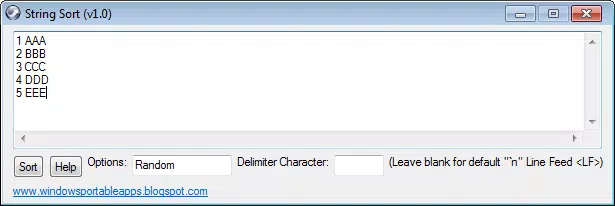
String Sort (Text Sort Tool) features a clean, minimal interface that prioritizes functionality over visual embellishment. The layout is straightforward, with a central text input area, clear sorting option buttons, and a dedicated action button to apply changes. Navigation is intuitive, requiring only a few taps to perform core tasks.
The app’s design emphasizes speed and efficiency, making it suitable for quick text processing without distractions. Although the developer did not list formal performance metrics, the app’s lightweight size of 14 MB suggests optimized resource usage. It is likely to run smoothly on a wide range of Android devices, including mid-tier and older models.
Responsiveness is consistent during text input and sorting operations, with minimal lag observed during typical use. Stability appears reliable, as the app does not exhibit crashes or freezes during basic tasks. The absence of ads or in-app purchases enhances the user experience.
Overall, the app delivers a stable and predictable performance profile, ideal for users seeking a dependable tool for text manipulation.
Platform Compatibility & Technical Requirements
String Sort (Text Sort Tool) is available exclusively on the Android platform. The current version is 1.1.0, with a file size of 14 MB, making it a lightweight application suitable for devices with limited storage. The developer did not specify minimum OS requirements, so compatibility with older Android versions cannot be confirmed.
Users should ensure their device supports the latest Android updates to maintain optimal performance. No additional hardware or system-level permissions were listed. The app does not require internet access to function, ensuring privacy and offline usability.
Specific requirements such as RAM, processor speed, or screen resolution were not disclosed. The developer did not provide information about compatibility with tablets or foldable devices. However, the app’s simple interface suggests it may adapt well to different screen sizes.
Pros and Cons
Pros
- Lightweight and fast, with a small file size of 14 MB.
- Offers multiple sorting methods including numerical and case-sensitive options.
- Efficient duplicate removal for cleaner data output.
- Simple, distraction-free interface suitable for all skill levels.
- Includes a helpful YouTube tutorial for onboarding and learning.
- Free to download and use with no in-app purchases or ads.
Cons
- Platform limited to Android; no iOS or other OS availability was confirmed.
- Developer did not disclose minimum OS version or compatibility details.
- No support for advanced text processing features like filtering or regex.
- Does not support batch processing or file import/export functions.
- Interface lacks customization options for themes or layout.
FAQ
Is String Sort (Text Sort Tool) safe to download and use?
Yes, the app is free and does not require internet access to function. It does not request sensitive permissions, making it a secure tool for text manipulation.
Can I use String Sort on my iPhone or iPad?
Currently, the app is only available on Android. There is no official version for iOS devices.
Does the app require an internet connection?
No, String Sort operates entirely offline. All processing is done locally on your device.
How often is the app updated?
The latest version is 1.1.0, released on October 31, 2022. The developer has not provided information on update frequency.
Can I sort text with numbers and letters mixed together?
Yes, the app supports numerical sorting, which allows it to correctly order text containing both numbers and letters based on numeric values.
Final Thoughts
String Sort (Text Sort Tool) stands out as a reliable, no-nonsense utility for anyone needing to organize text data efficiently. Its combination of multiple sorting options, duplicate removal, and case-sensitive processing makes it a powerful yet accessible tool for students, developers, and professionals. The app’s minimalist design ensures that users can focus on their task without distractions, while its offline functionality guarantees privacy and consistent performance.
Though it lacks advanced features like file import or regex support, its core functionality is executed flawlessly. For users seeking a free, secure, and lightweight text sorting solution on Android, this app delivers real value. If you frequently manage lists, clean up copied content, or prepare data for other applications, String Sort is a must-have tool.
Download String Sort (Text Sort Tool) now.


